
Pro Tip
To delete uncategorized categories in wordpress , users can delete WordPress categories in two ways: by deleting them one-by-one or by deleting them in bulk from the list of categories in WordPress. Learn how to delete categories in WordPress using the different methods below.
“Uncategorized” When you embark on your WordPress journey, you’ll notice an ever-present category called “Uncategorized.” It’s like that mysterious drawer in your kitchen where everything ends up—random, cluttered, and lacking purpose. But fear not! In this article, we’ll unravel the mystery behind this default category and explore practical steps to declutter your content. By the end, you’ll wield the power to tidy up your website, enhance user experience, and bid farewell to the enigmatic “Uncategorized.”

Table of Contents
Delete uncategorized category in WordPress
Delete and Rename uncategorized category in WordPress
In WordPress, the “Uncategorized” category is a default category that is automatically assigned to posts if you haven’t assigned them to any specific category. If you want to delete an uncategorized category or change its name, you can do so by following these steps :
- Login to Your WordPress Dashboard: Log in to the admin area of your WordPress website.
- Go to the Categories Section:
- In the left-hand menu, navigate to “Posts” and then click on “Categories.”
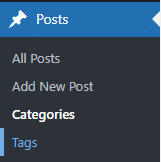
- In the left-hand menu, navigate to “Posts” and then click on “Categories.”
- Create a new category like you need:
- Make sure in the “uncategorized category” to not have any posts assigned.
- Go to the Settings Section:
- In the left-hand menu, navigate to “Settings ” and then click on “Writing.”
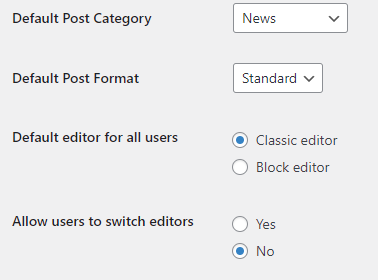
- Here you can assign a new “Category“.
- In the left-hand menu, navigate to “Settings ” and then click on “Writing.”
- Now Go to the Bake Categories Section: Now there is an option to delete an uncategorized category or rename it.
Remember, it’s a good practice to have well-organized categories for your blog posts, as it helps both your visitors and search engines understand the content structure of your site.
Understanding Categories in WordPress
Introduction to WordPress Categories
These are essential tools that help organize your website’s content into different sections.
- WordPress Category Management is a WordPress plugin that allows you to organize all your WordPress categories within the overview table of each content type—easily and flexibly.
- WordPress categories allow you to group your content based on genres or topics. Think of them as a way to create a table of contents for your website.
- When you write different types of content (such as blog posts), you can assign them to specific categories. This categorization helps readers quickly find relevant posts within your content collection.
- Categories are part of WordPress’ taxonomy system, which classifies various types of content on your site.
Significance of Category Organization
Category organization is crucial as it facilitates efficient information retrieval, aids in cognitive processing by grouping similar items together, and enhances communication by providing a shared framework for understanding and discussing complex concepts and topics.
Why Delete the Uncategorized Category?
Importance of a Clean Category Structure
A clean category structure is essential for improving website usability and navigation, allowing visitors to easily find relevant content. It enhances search engine optimization by providing clear signals to search engines about the organization and relevance of the site’s content. Additionally, a clean category structure streamlines content management, making it easier for website owners to organize, update, and maintain their content over time.
Avoiding SEO Pitfalls with Appropriate Categories
Avoiding SEO pitfalls with appropriate categories is crucial for ensuring optimal visibility and ranking of your website in search engine results. Incorrect or poorly chosen categories can lead to issues such as keyword cannibalization, where multiple pages compete for the same keyword, diluting the authority of each page. Additionally, having too many categories or using vague, irrelevant categories can confuse search engine crawlers and make it difficult for them to understand the thematic relevance of your content.
Impact on SEO and Blog Structure
SEO Benefits of Organized Categories
Organized categories offer several SEO benefits that can positively impact the visibility and ranking of your website:
Improved Navigation: Well-structured category pages make it easier for users to find relevant content on your website. Clear hierarchies enhance usability and overall user experience.
Internal Linking: Category pages facilitate internal linking, helping search engines understand the relationships between different pieces of content. Effective internal linking can positively impact rankings.
Keyword Optimization: By targeting relevant keywords in category titles, headings, and meta tags, you enhance visibility and attract organic traffic.
E-commerce Taxonomy: Classifying products into common categories (e.g., “clothing,” “electronics,” “home goods”) aids both users and search engines.
Ensuring Consistency in Blog Taxonomy
Consistency in blog taxonomy is crucial for effective branding and search engine optimization (SEO). Let’s explore some best practices to ensure a well-organized and consistent taxonomy:
Consistency Across Elements:
- Uniformity in how you categorize and label content is essential. Ensure that tags, categories, and other taxonomy elements are consistently applied across your website.
- Branding: Consistent taxonomy reinforces your brand identity and helps users recognize your content easily.
Strategic Keyword Integration:
- Keywords play a vital role in SEO. Incorporate relevant keywords into your taxonomy elements (e.g., category names, tags).
- Search Visibility: Well-optimized taxonomy can enhance your content’s visibility in search engine results.
Simple, Intuitive Structures:
- Design your taxonomy to be user-friendly. Intuitive categories and subcategories make navigation easier for visitors.
- Search Engine Indexing: Clear taxonomy structures help search engines understand your content and index it effectively.
Remember, a thoughtful taxonomy not only benefits SEO but also contributes to a seamless user experience.
Common Mistakes to Avoid
Forgetting to Assign a New Default Category
Let’s discuss the concept of setting a default category for WordPress posts and how it can help avoid the dreaded “Uncategorized” label.
The “Uncategorized” Dilemma:
- When you forget to assign a category to a new WordPress post, it defaults to the generic “Uncategorized” category.
- This isn’t ideal because it doesn’t connect readers with more relevant content on your blog.
Solutions:
- Editing the “Uncategorized” Category Slug: If you haven’t created any content yet, you can edit the “Uncategorized” category slug in the admin at Posts > Categories.
- Setting Default Categories: Another option is to set a default category at Settings > Writing. However, what if you want to use multiple categories?
WordPress Default Category Plugin:
- Plugin Functionality: The WordPress Default Category plugin allows you to select category defaults for new posts.
- Multiple Categories: You can choose multiple categories to assign to uncategorized posts.
- Use Cases: Forgetting to categorize a post isn’t a big deal because you can default it to more general categories like “News” or “Tutorial.”
Multisite Compatibility:
- Originally designed for multisite environments, this plugin works well on single WordPress installs too.
- Administrators can set default categories for their own sites.
Remember, setting up a default category streamlines content creation and ensures that posts don’t get lost in the generic “Uncategorized” bin. The WordPress Default Category plugin is a handy tool for maintaining consistency and improving user experience.
Overlooking SEO Implications
Overlooking SEO implications can be detrimental to the online visibility and success of a website. Failure to address SEO factors such as keyword optimization, site structure, and mobile-friendliness can result in poor search engine rankings, decreased organic traffic, and lost opportunities for audience engagement.
Moreover, neglecting SEO considerations may lead to a competitive disadvantage, as rival websites that prioritize SEO are likely to attract more visitors and achieve higher rankings. In today’s digital landscape, where search engines play a crucial role in driving traffic and generating leads, ignoring SEO can significantly hinder a website’s growth potential and limit its impact.
Therefore, it’s essential for businesses and website owners to proactively address SEO implications to maximize their online presence and achieve sustainable success.
Conclusion
In conclusion, optimizing your WordPress categories, especially by deleting the default “Uncategorized” category, is a strategic move for a well-organized blog. Enhance your site’s structure, improve user experience, and boost SEO by following the steps outlined in this comprehensive guide. Take control of your WordPress categories today for a more effective and user-friendly website.
FAQ
Why should I bother deleting the Uncategorized category?
Deleting the uncategorized category improves your site’s organization and prevents content from being inadvertently labeled. It enhances both user experience and SEO.
Can I create a custom default category?
Absolutely. You can easily set a new default category once you delete the uncategorized category, ensuring that all your posts have a relevant classification.
Will deleting the Uncategorized category affect my existing posts?
No, your existing posts won’t be deleted. They will be automatically assigned to the new default category you set.
How often should I review and update my categories?
Regularly reviewing and updating categories is good practice for maintaining a well-organized and SEO-friendly blog.
Is there a way to undo the deletion of a category?
Unfortunately, WordPress doesn’t have a built-in undo feature. However, by promptly setting a new default category, you can mitigate any potential issues.
In a Rush? Dive into Our Bite-Sized Web Stories!
If time is tight, explore our web stories—they’ll help you achieve your goals faster.